
Quelle: Eigene Darstellung
Ab sofort können alle Angehörigen der RWTH Aachen ihre eigenen Rollen direkt in der IdM Rollen- und Gruppenverwaltung einsehen. Auf der Startseite werden alle Rollen angezeigt, die euch über die Rollen- und Gruppenverwaltung zugewiesen wurden.
Damit wird der Zugriff auf eure eigenen Rollen und Gruppen einfacher: Ihr müsst dafür nicht mehr durch den IdM Selfservice navigieren. Bisher war der Zugriff auf die IdM Rollen- und Gruppenverwaltung nur für Personen mit der Rolle „Verwaltung Rollen“ möglich.
Warum gibt es Rollen?
Durch eure Einschreibung oder euer Beschäftigungsverhältnis erhaltet ihr beispielsweise den Status „Studierende(r)“ oder „Mitarbeitende(r)“. Auf dieser Grundlage werden euch im Identity Management (IdM) automatisch bestimmte Rollen zugewiesen. Diese legen fest, welche IT-Services und Anwendungen ihr an der RWTH nutzen könnt, wie zum Beispiel VPN oder eduroam. Diese automatisch zugewiesenen Rollen könnt ihr weiterhin im IdM Selfservice einsehen.
Für einige Services werden darüber hinaus spezielle Rollen benötigt, die nicht automatisch über euren Status vergeben werden. Wenn ihr beispielsweise eine Dienstreise beantragen möchtet, benötigt ihr dafür die Rolle „Antragsstellung Dienstreisen“. Solche Rollen werden von Rollenverwalter*innen über die IdM Rollen- und Gruppenverwaltung manuell vergeben.
Eigene Rollen direkt auf der Startseite einsehen
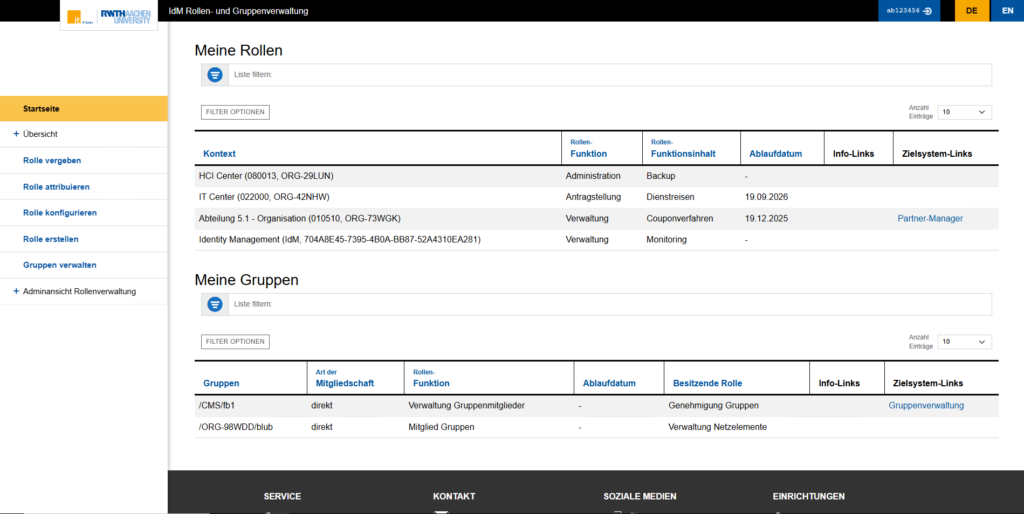
Bislang konntet ihr eure manuell zugewiesenen Rollen und Gruppen bereits im IdM Selfservice einsehen. Ab dem 26. August 2026 findet ihr diese Informationen nun auch direkt auf der Startseite der IdM Rollen- und Gruppenverwaltung. Nach dem Login werden euch dort alle Rollen und Gruppen angezeigt, die euch über die Rollen- und Gruppenverwaltung zugewiesen wurden.
Rollenverwalter*innen gelangen beim Aufrufen der IdM Rollen- und Gruppenverwaltung wie bisher direkt auf die Unterseite „Rollen“. Um die eigenen zugewiesenen Rollen und Gruppen einzusehen, einfach auf den Reiter „Startseite“ klicken.
An den Rollen und Gruppen können Berechtigungen für bestimmte Systeme und Services hängen. Informationen und Links zu diesen Systemen findet ihr unter „Zielsystem-Links“ in der jeweiligen Zeile der Rolle.
Quelle: Eigene Darstellung
Weniger Logins, schneller ans Ziel(system)
Die neue Startseite der IdM Rollen- und Gruppenverwaltung bietet nicht nur einen schnelleren Zugriff auf eure Rollen, sondern kann euch auch wiederholte Anmeldungen über den RWTH Single Sign-On ersparen. Für den IdM Selfservice gelten aufgrund der dort verwalteten hochsensiblen Daten kurze Shibboleth-Session-Zeiten. Nach Ablauf der Session ist bei einer erneuten Anmeldung die Eingabe einer Multifaktor-Authentifizierung (MFA) erforderlich.
Die IdM Rollen- und Gruppenverwaltung benötigt dagegen keinen neuen Login, solange eure bestehende Shibboleth-Session noch aktiv ist. Wenn ihr beispielsweise im Laufe eines Tages mehrfach eure Rollen oder die zugehörigen Zielsysteme einsehen möchtet, könnt ihr deshalb direkt auf die IdM Rollen- und Gruppenverwaltung zugreifen. Mit der neuen Startseite wird der Zugriff auf eure eigenen Rollen und Gruppen damit einfacher und übersichtlicher.
Verantwortlich für die Inhalte dieses Beitrags sind Leif Janissen, Thorsten Kurth und Hannah Loock.








Schreibe einen Kommentar