
Source: Own illustration
Good news for everyone who uses RWTHgpt: RWTH’s generative AI service now also supports the creation of images. This means that students, faculty, and administrative staff can now not only generate text but also create and refine their own graphic content directly in RWTHgpt.
Whether it’s illustrations for courses, visualizations for presentations, learning materials, concept sketches, or creative graphics for projects: The new image generation models support a wide range of tasks in academic studies, research, and day-to-day work at RWTH.
From Idea to Image in Just a Few Steps
It’s easy to use: Simply describe exactly what you want the image to depict via text input, and RWTHgpt will quickly generate a suitable image suggestion. The generated images can then be further refined and edited iteratively. This way, you can turn an initial idea into the desired result step by step.
Initially, there are two different image generation models to choose from, and you can switch between them depending on your specific use case. Additionally, various parameters can be adjusted, such as image quality, the desired format, or image size.
Detailed instructions can be found on IT Center Help in the article “Image Generation” under the RWTHgpt Documentation.
Source: generated using RWTHgpt
Support for Teaching and Learning
Image generation offers particularly interesting applications in an educational context. Instructors can, for example, create illustrations for lecture slides, visualizations of complex topics, or graphics for exercises.
Of course, the new image generation models can also be used for creative experiments, provided that the applicable rules for using generative AI systems at RWTH are followed.
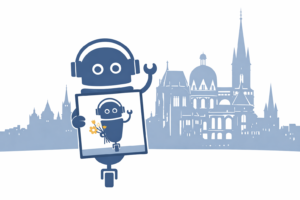
Naturally, we’ve also tried out the new feature ourselves. Here’s the result of our experiment. To do this, we used the prompt: “Create an image of the KI:connect robot holding up a picture of itself, with a stylized silhouette of Aachen in the background.”
Responsible use remains important
To ensure that image generation is used safely and in compliance with the law, the existing guidelines for generative AI services at RWTH also apply to the creation of images.
Before using the service, all users must have read and understood the checklist for the legally compliant use of image-, audio-, and video-generative AI services (German only). The requirements described there—particularly regarding data protection and the handling of sensitive information—must be strictly adhered to. The checklist can be easily accessed in the RWTHgpt web interface by clicking the question mark icon in the lower-right corner of the screen and selecting the menu item “Checklist for Legally Compliant AI Media Use.”
Image generation is intended to support work in academic studies, teaching, and administration. This requires the responsible use of the tools provided. Violations of the applicable regulations may result in appropriate consequences.
Usage Notes
The number of available interactions for image generation is limited. Information on the currently available quota is displayed directly in the application for each model.
The new feature is available to all users with the status “RWTH Student,” “RWTH Employee,” or “Member of FB10” in RWTHgpt. It expands the platform by offering another way to make effective use of generative AI for studies, teaching, and work at RWTH.
We hope you enjoy trying it out and look forward to seeing the creative and innovative ways it will be used within the RWTH community.
Responsible for the content of this article are Melisa Berisha and Robin Jakobitz.









Leave a Reply