


Source: Own illustration
In the coming weeks, the Coscine login process will change: The current Single Sign-On (SSO) will be disabled. After that, the only login options available will be “Login (All Institutions)” and “ORCID.”
For many users, this will not change anything. However, if you have multiple Coscine accounts or have previously logged in exclusively via Single Sign-On, you should take action now.
Background on the Change
Previously, DH.NRW universities were individually connected to the Coscine login as part of the onboarding process. As a result, only selected universities currently appear in the list of available institutions after selecting Single Sign-On for login.
With the introduction of the login option via the NFDI RegApp Community AAI, this has changed: All DH.NRW universities are now displayed in the selection list. To keep the login process as simple and intuitive as possible for users, this login option is called “Login (All Institutions)” in Coscine. The previous single sign-on option is therefore now only accessible via a link in the description text on the login page and will be completely disabled in the coming weeks.
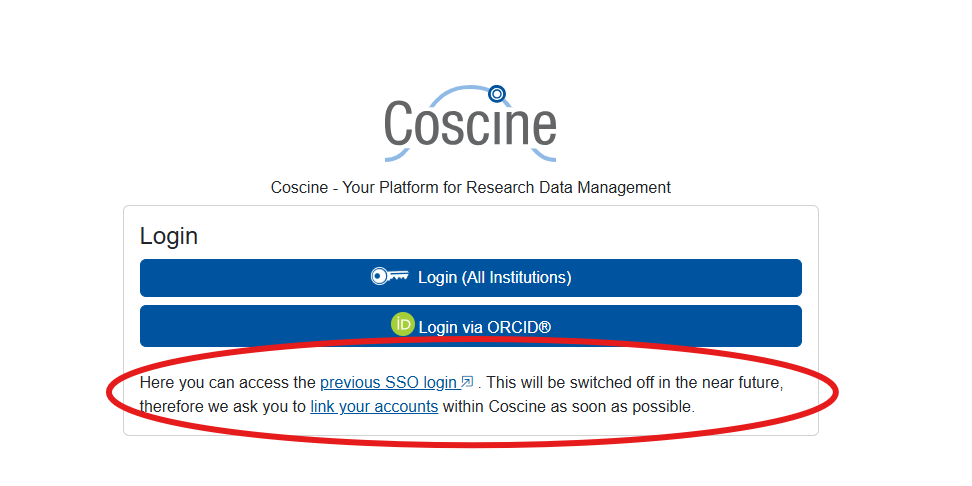
Source: Coscine
The change also brings advantages for onboarding additional institutions. New universities no longer need to be connected individually, which reduces the organizational and technical effort. Additionally, virtual organizations can now be registered in RegApp, and they too can receive a defined quota of default storage space (e.g., 100 GB of web storage).
Important: Linking Accounts
It is also important to link existing accounts to one another. In Coscine, a separate account is created for each login method. So, for example, anyone who uses both the previous single sign-on and ORCID or “Login (All Institutions)” has multiple accounts.
To ensure long-term access to research data and projects, these accounts should be linked to one another in a timely manner. Further information on this is available in the Coscine documentation.
How to Link Your Accounts
All users who have previously logged in only via Single Sign-On and have not linked their accounts have already been asked via email to link their accounts. If you have received such a notification, please follow these steps:
- First, log in to Coscine again via Single Sign-On (as long as this link in the description text on the login page is still available).
- Open your user profile by clicking your name in the top-right corner.
- In the “Login (All Institutions)” section, click “Connect.”
- Follow the instructions to merge your accounts.
- Optionally, you can then also link your ORCID.
ORCID Remains Available
Login via ORCID will continue to be available. This allows researchers worldwide to continue using Coscine and, for example, to be invited as collaboration partners on projects.
Learn More
Feel free to subscribe to the Coscine newsletter or visit the Coscine website for the latest news, and please let your colleagues and project partners know about the upcoming change.
Responsible for the content of this article are Katja Jansen and Arlinda Ujkani.









Leave a Reply