

Source: Own Illustration
A warm welcome to RWTH Aachen University! To help you get off to a good start in your studies, make sure your smartphone, tablet, and laptop are set up and ready to use for RWTH’s most important IT services.
Together, We’ll Get Your Devices Ready for RWTH
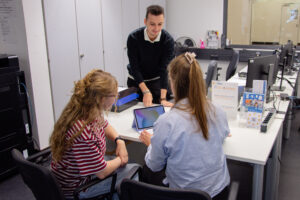
At TreMoGe – the Mobile Device Help Desk, we provide in-person support during our opening hours to help you set up and use important IT services on your devices.
Among other things, we can help you with:
- Setting up multi-factor authentication (MFA).
- setting up your RWTH-E-Mail-address in popular email clients.
- installing and setting up the RWTH VPN (Virtual Private Network).
- setting up eduroam (Wi-Fi).
- using Microsoft 365 via the university portal.
We’ll walk you through everything together right on your device and provide further assistance if something isn’t working yet.
TreMoGe at the IT Center
If you’d like to set up an RWTH IT service on your smartphone, tablet, or laptop, or if you need a problem checked directly on your device, TreMoGe at the IT-ServiceDesk in the IT Center (Seffenter Weg 23) is the right place to go.
How to Use TreMoGe
As a student, you can book an appointment via the TreMoGe calendar. You’ll need your student ID number to do so. Once your booking is confirmed, you’ll receive a confirmation email.
Bring the devices you need help with to your appointment. If additional information or license details are required for a service, please have those on hand as well.
For Small Matters at SuperC
Not every issue requires a TreMoGe appointment. For quick questions or issues that don’t require detailed setup or troubleshooting on your own device, you can stop by the IT-ServiceDesk at SuperC without an appointment.
TreMoGe Is Here for Everyone
TreMoGe isn’t just for students who are new to RWTH. Students in higher semesters can also take advantage of this personalized support at any time.
In addition, TreMoGe is also available to employees of RWTH and the University Hospital (UKA). You can stop by during the IT-ServiceDesk’s opening hours without making an appointment in advance. Depending on the nature of your issue, however, it may still be helpful to contact us beforehand by phone or email.
Responsible for the content of this article is Maike Lennartz.









Leave a Reply